
A timesheet records hours.
An invoice question asks for context.
The supplied case-study brief describes 3 Link Sales as a sales development consulting and outsourced-sales business. In that setting, work can span employees, client accounts and several software systems. An invoice needs more than a total: the team must be able to explain the approved period, assignment and work behind it.
A time entry alone may not explain why a task took longer, which client the work supported, or whether a gap reflects a call, research, a disconnection or missing time. When supporting information sits in calendars, CRM notes, messages and memory, answering a billing question can turn into a reconstruction exercise.
Can a manager trace an approved billable hour to a clear work record—and explain any exception?
The draft identifies three review problems: invoice questions arrive after the work, descriptions vary across employees, and managers discover incomplete or conflicting entries too late. These are the challenges the proposed workflow addresses; the customer’s baseline still needs confirmation.
Build an evidence chain.
Give each signal a purpose.
The approach in the brief keeps recorded time as the primary business record. Activity context helps investigate a specific question. Optional screenshots are a supporting source when relevant and permitted. A manager interprets the evidence before anything becomes client-facing.
Time record
The period and work description being reviewed.
Activity context
Relevant application, timeline or interruption signals.
Human explanation
Calls, planning, research and work a device cannot fully show.
Manager decision
Approved hours, resolved exceptions and a release decision.
Why more screenshots are not the answer
A screenshot can show an application at a moment in time. It cannot, by itself, establish the correct client, billable duration, work quality or engagement terms. Quiet device activity also does not rule out useful client work. See our guide to employee monitoring software with screenshots for the limits of visual evidence.
Where Neebix can provide context
Neebix’s public workforce monitoring features describe timesheets, activity timelines, app and website usage, optional screenshot capture, team and device visibility, and privacy-aware settings. Those records can inform the review process described here.
Client assignment, exception approval, corrections and invoice preparation are business-process steps in this draft. The brief does not establish that each is a native Neebix feature, or which settings 3 Link Sales actually used.
For the distinction between logging time and interpreting activity, read time tracking vs employee monitoring.
Review the exception
before the invoice.
The proposed workflow focuses attention on the entries that need clarification. A routine approved hour should not require an investigation of every minute.
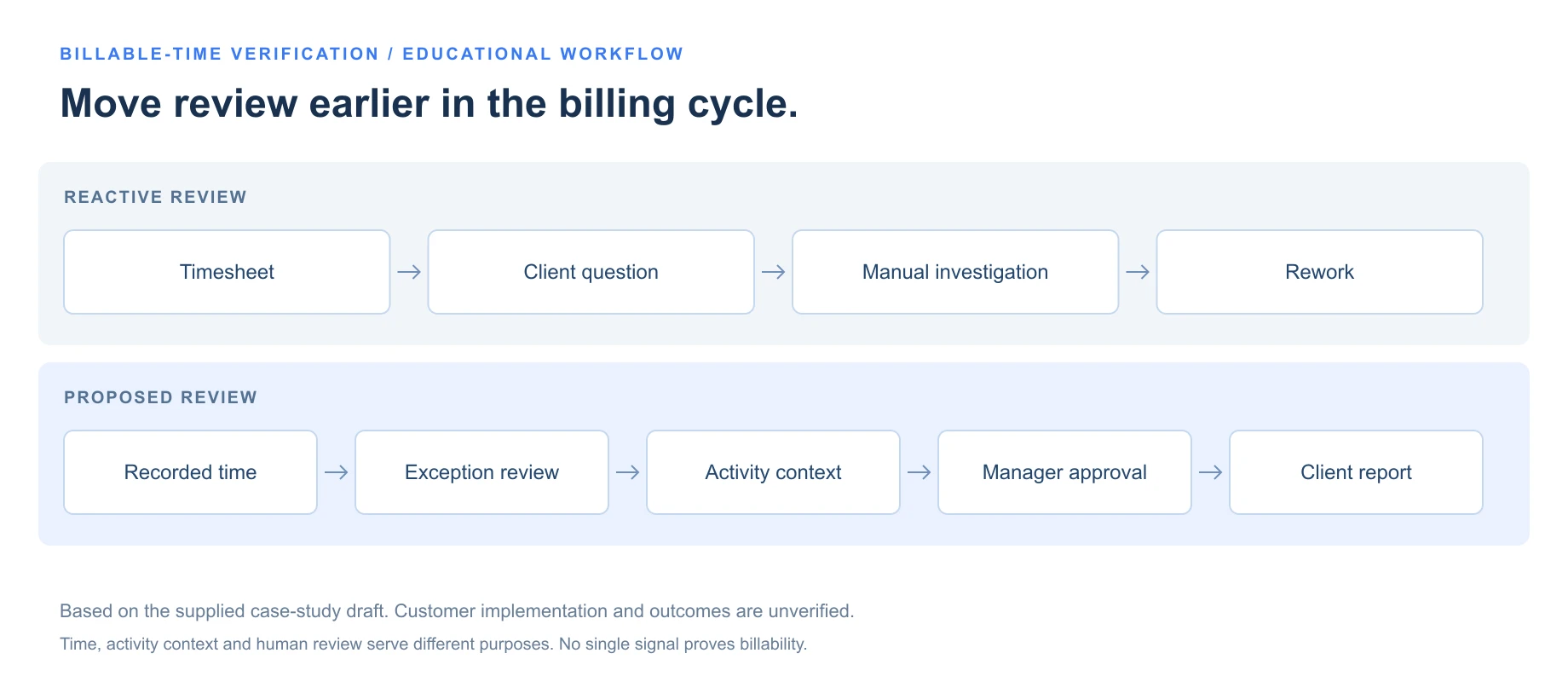
Move review earlier in the billing cycle.
- Timesheet
- Client question
- Manual investigation
- Rework
- Recorded time
- Exception review
- Activity context
- Manager approval
- Client report
Record the work
Use the team’s existing client-assignment and approved work-category process. Record the period and describe the work clearly.
Review the hours
Check a timesheet summary for missing time, unexpected variances, incomplete descriptions, wrong assignments or overlapping entries.
Investigate the exception
Review the relevant activity timeline for the questioned period. Applications, idle signals and disconnections help frame a question; they do not answer it alone.
Add human context
Ask about client calls, research, planning and offline work. Give the employee a way to explain the record and propose a correction.
Approve a client-ready record
The manager decides which hours meet the engagement terms, documents the exception and releases only the information the client needs.
Connect time records with an exception review.
Time is the primary record. Activity and explanations help a manager resolve a specific question.
| Review area | Reactive process | Proposed process |
|---|---|---|
| Time records | Hours viewed in isolation | Recorded hours reviewed with relevant work context |
| When review happens | Reconstruct the work after a client question | Resolve exceptions before finalizing an invoice |
| Supporting evidence | Calendars, messages, CRM notes and recollection | A repeatable review of the specific record and period |
| Work descriptions | Inconsistent detail across entries | An agreed standard for categories and explanations |
| Manager attention | Broad manual checking for each question | Focused review of missing, conflicting or unusual records |
| Visual evidence | Screenshots can become the main evidence source | Optional, relevant visual context under an agreed policy |
| Client response | An unclear entry can weaken the whole invoice | Share approved hours with an engagement-specific explanation |
On a small screen, scroll the table or diagrams to see all columns.
Start with the records your team needs.
Compare the available time and activity features with your client-review process.
Measure the change
before claiming the result.
The supplied draft proposes fewer billing disputes, faster invoice support, fewer timesheet corrections and better support for legitimate billable work. It provides no completed measurements, baseline dates, comparison periods or approved customer quotation. Those outcomes remain unverified.
The following measures define what would be needed to substantiate the story. They are an evidence plan, rather than customer result cards.
- Billing disputes
- Choose one definition—disputed invoices, challenged line items, disputed value or clarification requests—and compare consistent periods and billing volume.
- Invoice-support time
- Record the hours actually spent preparing evidence and answering invoice questions before and after rollout. Use the same scope of work.
- Timesheet corrections
- Measure corrections against comparable time-entry volume, with a consistent definition and an explanation of any process change.
- Supported billable work
- Use customer-approved billing records to identify legitimate hours retained or corrected. Do not infer recovered revenue from an assumed hourly rate.
Without those records, it is possible to describe the intended review process. It is not possible to state that 3 Link Sales reduced disputes, saved a particular number of hours or recovered a particular amount of revenue.

A client-ready record
has a defined boundary.
Billing evidence can include sensitive employee and client information. The relevant question is not how much data can be collected, but which records are needed, who may review them and what may leave the organization.
- Define when monitoring begins and ends, including work periods and exceptions.
- Document whether screenshots are enabled, and when they are necessary.
- Limit detailed records to authorized roles and apply documented retention periods.
- Give employees a route to explain or correct inaccurate records.
- Share only approved hours, relevant categories and necessary explanations with the client.
- Keep unrelated activity, raw screenshots and confidential conversations out of routine client reports.
Adapt the employee monitoring policy template to the settings your team actually uses. The draft does not confirm 3 Link Sales’ capture schedule, screenshot settings, permissions or retention rules.
Release an approved summary, with a clear privacy boundary.
Client reporting is a separate decision from access to employee work records.
The process matters
more than the volume of data.
A timesheet is stronger in context.
Keep recorded hours at the center of the business record. Use supporting activity to resolve a question about those hours.
Investigate exceptions, not every minute.
Concentrate review on incomplete, conflicting or unusual records, with a clear path to employee explanation.
Separate client reports from raw monitoring.
A client may need approved hours and work categories. That does not automatically create a need for employee screenshots or browsing history.
Make the review repeatable.
An agreed standard for interpretation, correction and approval makes a record easier to explain than an unstructured archive.
For BPOs and other outsourced-service teams, work often crosses people, tools and client engagements. A monitoring platform cannot make every hour billable. A careful review can help a manager decide which records support the agreed engagement terms.
Use our employee monitoring software for BPOs guide to compare the operational fit, and our employee monitoring software pricing guide to compare the cost model.
Explore related stories.
 Remote & Hybrid Teams / review draftPinpoint Hire: Work context for more focused manager conversationsCustomer approval and outcome evidence pending. ↗
 Operations & Back Office / review draftTransit & Flow: Connecting workflow evidence with capacity decisionsCustomer approval and outcome evidence pending. ↗
 Customer Support & Call Center / review draftLendware: Connecting support coverage with capacity decisionsCustomer approval and outcome evidence pending. ↗
 Agency & Professional Services / review draftSpruce InfoTech: From reviewed project hours to clearer cost decisionsCustomer approval and outcome evidence pending. ↗