
The queue shows demand.
What explains the coverage?
Lendware’s official company page describes a mortgage CRM platform for loan officers and enterprise teams, with pipelines, automation and management tools. The supplied brief focuses on its customer-support operation. Public company information establishes that business context; it does not verify a Neebix relationship or the rollout described in the draft.
A help desk can show incoming conversations, completed tickets, first response, resolution and backlog. Those records may show that service slowed during a busy period. They do not, by themselves, explain whether coverage matched the approved schedule or why a gap appeared.
The brief describes questions around late starts, early finishes, incomplete shifts, concentrated breaks, meetings, technical interruptions and uneven workload. It does not supply the actual roster, support hours, help-desk platform, previous attendance process or participating team size.
Does the team need more people, a different coverage plan, or help resolving the work that interrupts support?
Ticket totals are only part of the story
One conversation may be a quick answer; another may involve investigation, a dependency or an escalation. Training, documentation, handoffs and approved meetings also consume time. Comparing agents by ticket count or mouse movement alone can miss that work and the quality of the service delivered.
The proposed review connects approved schedules → recorded work sessions → support workload and outcomes → relevant activity context → a manager and agent explanation.
Keep the inputs distinct.
Bring the context together.
The supplied model uses workforce records alongside the existing scheduling and support process. Each answers a different question. A stronger review preserves those boundaries rather than treating all the data as one productivity score.
Scheduling record
The approved shifts, time zones, breaks, leave, meetings and training that define expected coverage.
Neebix work record
Permitted sessions, time records, app usage, device state and relevant activity context.
Help-desk outcomes
Tickets or conversations, response and resolution time, backlog, reopen rates and customer satisfaction.
HR and finance context
Approved headcount plans, expected hiring dates and the staffing assumptions behind the decision.
What Neebix contributes
Neebix’s public workforce monitoring features describe timesheets, clock-in and clock-out signals, activity timelines, app and website usage, device status, optional screenshots and manager reports. A relevant record can help narrow a coverage question.
Neebix does not replace the help desk in this model. The brief does not establish native roster management, automated schedule-adherence scoring, break approval, time-zone synchronization, queue integrations or staffing alerts. Comparison, interpretation and action describe the organization’s review process; its actual implementation needs confirmation.
Use the signal to ask a better question
| Observed signal | Context to check |
|---|---|
| Fewer resolved tickets | Complex cases, reduced demand, less queue coverage, meetings or a tool problem |
| No recorded device activity | Approved absence, disconnected tracker, device fault, work away from the device or a late start |
| Longer resolution time | Issue complexity, another team’s dependency, training needs or an application interruption |
| Work after the planned shift | Backlog, escalation load, allocation problems or a schedule mismatch |
| High demand and slower first response | Peak coverage shortage, nonqueue duties, uneven routing or a genuinely larger workload |
Read time tracking vs employee monitoring to distinguish a recorded period from its interpretation. For broader performance reviews, use employee productivity metrics for output, quality and workload.
Start with the schedule.
Finish with a reviewed action.
The proposed workflow focuses on meaningful exceptions. The purpose is to understand a coverage problem and respond to its cause, while preserving time for breaks, learning, documentation and difficult cases.
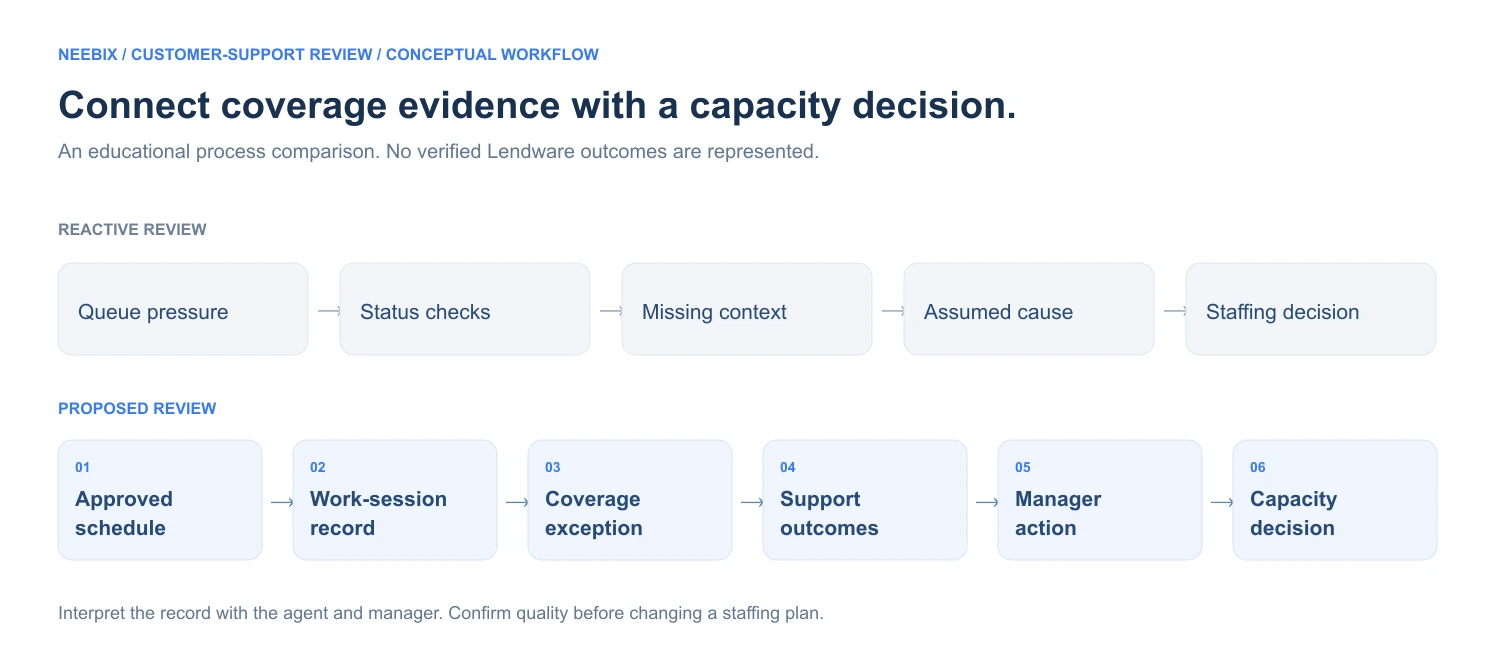
Connect coverage evidence with a capacity decision.
- Queue pressure
- Status checks
- Missing context
- Assumed cause
- Staffing decision
- Approved schedule
- Work-session record
- Coverage exception
- Support outcomes
- Manager action
- Capacity decision
Define the approved coverage baseline
Confirm shift start and finish, the applicable time zone, breaks, leave, meetings, training and backup responsibilities. Use the agreed roster rather than reconstructing a schedule from activity.
Review the recorded working pattern
Use permitted Neebix sessions, timesheets, device state and relevant activity context. Check whether the record is complete before interpreting an apparent gap.
Compare schedule and actual coverage consistently
Apply one approved adherence definition. Confirm what counts as covered support time, which shifts or minutes are eligible, and how approved exceptions are treated.
Connect coverage with support outcomes
Compare the same time windows with help-desk demand, first response, resolution, backlog and quality. A device session is not a ticket outcome or proof that an agent was available to the queue.
Ask what caused the exception
Review the roster and agent’s explanation. Check technical issues, complex cases, handoffs, documentation, approved meetings, training and work away from the device.
Agree an operational response
Consider changes to break timing, meetings, backup coverage, routing, documentation or technical support. Record the actual action and owner; these are options, not confirmed Lendware actions.
Reassess staffing with service-quality guardrails
Review post-change demand, usable coverage, workload sustainability and customer outcomes. Additional hiring may still be the appropriate decision.
Review the coverage exception before drawing a conclusion.
Compare the approved roster with work-session evidence, then resolve the question with the agent and an authorized manager.
| Review area | Reactive process | Proposed process |
|---|---|---|
| Presence | Repeated attendance or status checks | Review recorded periods against the approved roster |
| Queue pressure | Respond after a backlog appears | Compare demand with the relevant coverage window |
| Schedule context | Review schedules and queue totals separately | Bring both records into a scoped manager review |
| Manager follow-up | Ask broadly who is working | Narrow the question to a defined exception |
| Capacity | Treat rising ticket volume as a staffing answer | Investigate coverage, complexity and workflow first |
| Breaks and meetings | Unclear treatment in coverage comparisons | Use an agreed definition for approved nonqueue time |
| Productivity | Rely on ticket totals or input activity alone | Review output, quality, workload and context together |
| Hiring | Expand the team without a coverage review | Use reviewed capacity and service outcomes to inform timing |
On a small screen, scroll the tables or diagrams to see all columns.
Build a clearer schedule-adherence review.
Compare available work records with your existing coverage and customer-support process.
Define coverage first.
Then examine usable capacity.
Schedule adherence needs an approved definition before any before-and-after comparison. Two possible methods from the brief are shown below. They measure different things and should not be blended into one result.
- Shift-compliance method
- Compliant eligible scheduled shifts ÷ total eligible scheduled shifts × 100
- Covered-time method
- Confirmed covered minutes within the approved shift ÷ expected covered minutes in that shift × 100
For shift compliance, define the allowed start and finish tolerances and what makes a shift compliant. For covered time, define actual support availability, the expected coverage window and the treatment of breaks, leave, meetings and training. Match the time zone and compare the same eligible population over equivalent periods.
A zero denominator is not applicable, rather than zero adherence. Out-of-window overtime does not offset an in-window gap. Device sessions alone cannot establish queue coverage: validate availability with the appropriate operational records and human context. These are educational methods, not Lendware’s confirmed policy.
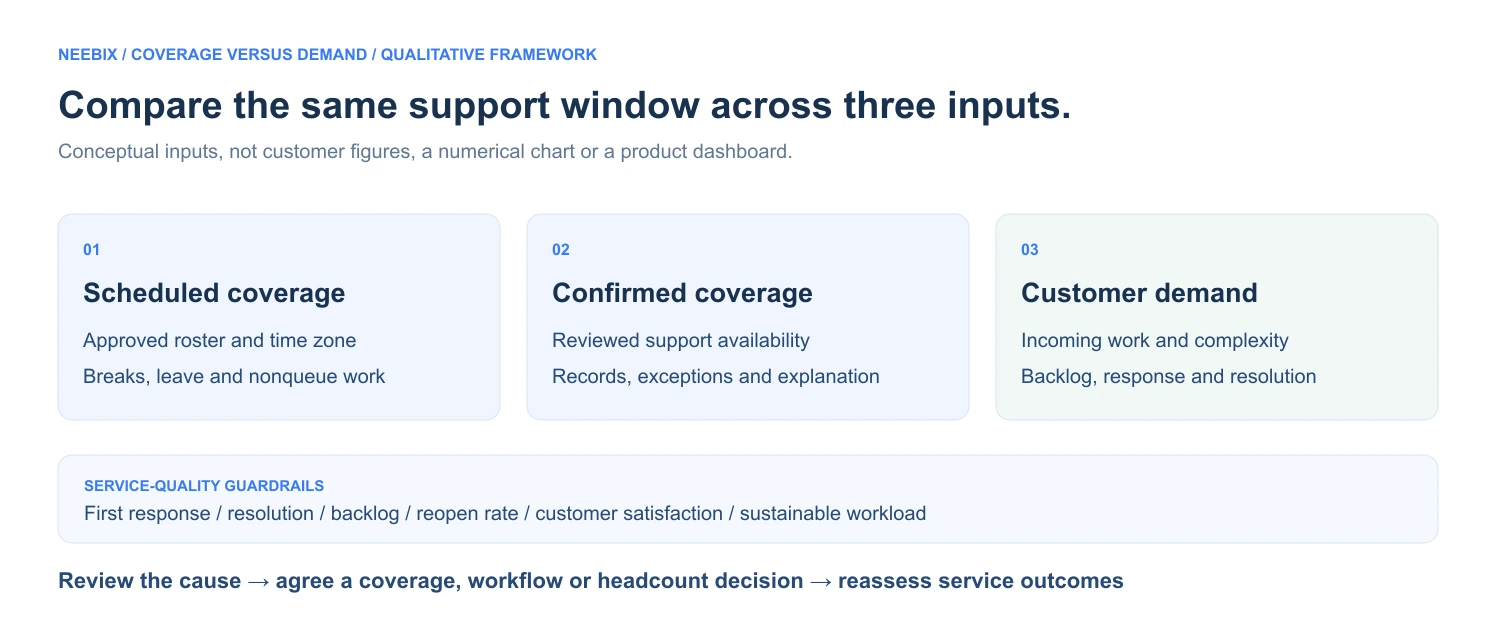
Compare the same support window across three inputs.
Scheduled coverage
Approved agents, shifts, breaks, leave and nonqueue responsibilities.
Confirmed coverage
Reviewed availability after checking records, exceptions and explanations.
Customer demand
Incoming work, complexity, backlog and the response or resolution trend.
Test the explanation before changing the staffing plan
If a shortfall coincides with concentrated meetings or breaks, consider whether the coverage plan can change. If technical faults explain missing records, resolve the recording problem. If complex demand and escalation load exceed available capacity, additional staff may be needed.
Usable capacity means support work the team can sustainably handle while maintaining agreed service standards. A higher activity percentage does not establish recovered support hours, extra ticket throughput or an avoided hire. Compare first response, resolution, backlog, reopen rates and customer satisfaction alongside the workload.
Bring coverage and service outcomes into the staffing review.
Workforce records and help-desk outcomes remain separate inputs. A service owner and an approved hiring plan add the context for a decision.
For distributed support operations, the remote employee monitoring software guide explains work-period and device-coverage questions to verify. This draft does not confirm Lendware’s work model or a time-zone integration.
Every outcome needs
its own evidence.
The supplied narrative proposes improved adherence, recovered capacity, fewer status checks and a more informed hiring decision. All result fields remain placeholders. No approved measurement period, rollout population, source records or actual staffing decision was supplied.
The following measures are an evidence plan, not Lendware results.
- Schedule adherence
- Keep the approved formula, eligible shifts or minutes, time zone, baseline and comparison periods, source records, calculation owner and exception rules.
- Late starts and incomplete shifts
- Define late starts, early finishes and incomplete shifts separately. Use comparable populations and denominators; check roster changes, approved absences and technical faults.
- Recovered usable support hours
- Document additional support availability within the relevant coverage window. Explain the operational change and confirm it with service records rather than input activity.
- Additional workload handled
- Compare tickets or conversations with issue complexity, channel mix and comparable periods. Verify first response, resolution, backlog, reopen rates and satisfaction alongside throughput.
- Manager administration time
- Measure the same attendance checks, status requests, reconciliation, investigations and reporting work before and after the change. Separate setup and training from recurring work.
- Hiring decision and timing
- Retain the approved hiring plan, expected start date, actual decision, deferral duration, workload and service-quality evidence. A deferred hire is not a permanently eliminated role.
Record other changes that may affect the comparison: seasonality, product launches, staffing changes, ticket mix, new training, routing changes and technical improvements. The chronology must explain how work records and management actions contributed to any approved outcome.
Until that evidence is available, the page cannot claim an adherence percentage, recovered weekly hours, extra tickets, manager-time savings, avoided staffing cost or improved customer satisfaction.

A coverage gap
starts a conversation.
An absent device record does not establish misconduct or low performance. Confirm the approved roster, time zone, leave, accommodation, device connection, tracker state, meetings, training, work away from the device and the agent’s explanation before reaching a conclusion.
- Define the included teams, work hours and purpose of the review.
- Confirm whether screenshots are enabled and which applications or periods are excluded.
- Limit individual records to authorized reviewers and agree retention.
- Provide a route for explanations, roster corrections and recording errors.
- Document how breaks, leave, training and accommodations affect the coverage definition.
- Separate a coaching conversation from any employment decision.
- Share only scoped, approved summaries; protect borrower records, loan information, ticket content, private messages and unrelated browsing.
The actual Lendware configuration, access, retention, screenshot policy and correction process are unconfirmed. Adapt the employee monitoring policy template to the settings actually used. The screenshot monitoring guide explains capture and review questions to verify before enabling visual records.
Use the review to make
a better service decision.
Adherence is a coverage measure.
It does not fully describe work quality, case complexity or the customer’s experience.
Queue data and work records have different jobs.
Keep customer outcomes in the help desk and use workforce records to investigate the working pattern behind them.
Capacity needs quality guardrails.
More activity or more closed tickets does not prove a sustainable increase in support capacity.
Investigate exceptions with people.
A defined question, a relevant record and the agent’s explanation are more useful than reviewing every minute.
Hiring can still be the right answer.
Review coverage and workflow first, then assess remaining demand and service commitments against the staffing plan.
The intended connection is schedule alignment → dependable coverage → usable capacity → maintained service quality → better staffing timing. Each step needs evidence before it becomes a customer outcome claim.
When evaluating a tool, review employee monitoring software pricing alongside Neebix pricing. Confirm the needed records, reports, retention and controls; the brief does not identify a customer plan or commercial agreement.
Explore related stories.
 Remote & Hybrid Teams / review draftPinpoint Hire: Work context for more focused manager conversationsCustomer approval and outcome evidence pending. ↗
 Operations & Back Office / review draftTransit & Flow: Connecting workflow evidence with capacity decisionsCustomer approval and outcome evidence pending. ↗
 Agency & Professional Services / review draftSpruce InfoTech: From reviewed project hours to clearer cost decisionsCustomer approval and outcome evidence pending. ↗
 BPO & Outsourcing / review draft3 Link Sales: A clearer record behind every billable hourCustomer approval and outcome evidence pending. ↗