
Collecting hours is only
the start of the review.
The supplied brief describes Spruce InfoTech as an IT services, staffing and outsourcing business. Its official contact page lists a head office in Exton, Pennsylvania, and locations in Toronto, Noida and Hyderabad. Those public locations do not establish which teams or offices participated in a Neebix rollout.
For a professional-services organization, delivery can span employees, clients, technologies and engagement terms. Leaders need to know how much effort a project consumed and whether the economics still support the delivery plan. Late or inconsistently classified hours make both questions harder to answer.
The brief describes a reconciliation burden involving missing entries, project-code corrections, overlapping records, unexplained gaps and repeated requests for context. It does not identify the actual previous timesheet platform, participating department or baseline administrative hours.
Can project leaders review dependable actual hours while there is still time to act on a variance?
Reconciliation involves more than finance
- Employees may need to reconstruct work from memory or correct a description.
- Project managers need to distinguish a recording issue from a genuine delivery exception.
- Finance needs consistent project hours before applying cost rates and reviewing contribution.
- Account leaders need enough context to discuss scope, staffing or an approved change request.
A month-end total can explain an overrun after it happened. Reviewing the underlying record during delivery can support an earlier conversation, provided the organization has a defined process and the right financial inputs.
Reliable hours are an input.
Activity is context.
The model in the supplied draft connects recorded time, approved project allocation, relevant activity context and manager review. It then uses budgets, rates and revenue from the appropriate business system. An activity score cannot establish the client assignment, billability, work quality or profitability of a project.
Work record
The recorded period and permitted activity context.
Project classification
The engagement and work category confirmed through the team’s existing process.
Human review
An explanation of revisions, incidents, calls, dependencies or recording mistakes.
Financial context
Authorized budgets, revenue, cost rates and direct delivery costs.
What Neebix contributes
Neebix’s public workforce monitoring features describe timesheets, attendance signals, daily activity timelines, app and website usage, optional screenshots, reports and team/device controls. Those records can help an authorized reviewer investigate a questioned period.
The brief does not verify native project coding, timesheet approvals, automated budget alerts, PSA/ERP integrations or profitability calculations. Classification, correction, approval and transfer describe organizational steps here. The exact software implementation and chosen financial system require confirmation.
Why an activity score does not settle a variance
Architecture review, client calls, deployment planning and difficult investigations can create useful work without continuous mouse or keyboard input. High activity can also occur on the wrong assignment. Use a relevant timeline to narrow a question, then ask the employee or project lead for context.
Read time tracking vs employee monitoring for the distinction between a time record and its interpretation, and how to measure employee productivity for output, quality and workload measures.
Resolve the exception.
Carry reviewed hours forward.
The proposed change is a repeatable review of the records that need attention. It does not require a manager to inspect every minute, and it does not assume that all captured activity is billable.
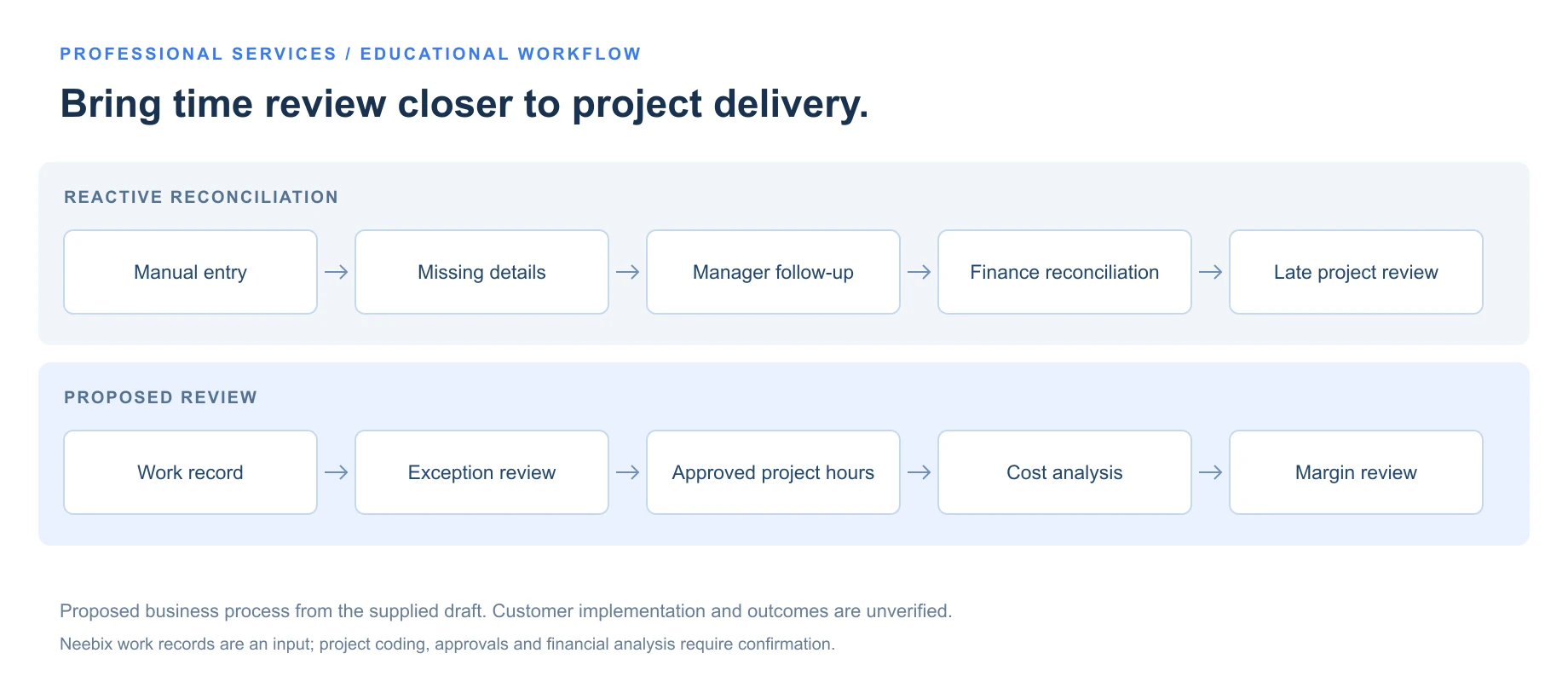
Bring time review closer to project delivery.
- Manual entry
- Missing details
- Manager follow-up
- Finance reconciliation
- Late project review
- Work record
- Exception review
- Approved project hours
- Cost analysis
- Margin review
Capture the working record
Collect permitted work-session, timesheet and relevant activity information within agreed monitoring periods. Keep the policy and access boundaries explicit.
Confirm the project context
Use the existing approved process to associate time with a client, project or work category. Resolve shared work and internal administration consistently.
Identify records needing review
Focus on missing time, incomplete classification, duplicate entries, unexplained gaps and material differences between expected and actual effort.
Add employee and project context
Review the relevant timeline and ask about client revisions, technical complexity, incidents, dependencies, meetings, offline work or recording errors.
Approve the project hours
Complete corrections and document the manager’s decision. Reviewed hours become the accepted labor-time input for the relevant business process.
Compare effort with project economics
In the existing project or finance system, compare approved effort with estimates, applicable cost rates, revenue, direct costs, milestones and remaining scope.
Agree the next delivery decision
Investigate whether staffing, a scope clarification, a change request, dependency escalation or revised estimate is appropriate while the project is still in progress.
Resolve the time exception before approving project hours.
A permitted work record, an approved classification and human context inform a manager’s decision.
| Review area | Reactive process | Proposed process |
|---|---|---|
| Review effort | Broad manual checking of each timesheet | Focus on entries with defined exceptions |
| Missing context | Repeated follow-up across several tools | A question narrowed to the relevant record and period |
| Timing | Reconstruct work at the end of a reporting period | Review incomplete records closer to the work |
| Classification | Inconsistent project or work-category descriptions | An agreed classification and correction standard |
| Finance input | Wait for corrections before reviewing project cost | Use reviewed project hours as the labor-time input |
| Budget review | Discover variance at billing or project close | Compare effort, estimates and remaining scope during delivery |
| Business context | Review work records and financial records separately | Bring approved time into the existing commercial review |
| Investigation | See an overrun without understanding the cause | Investigate the workstream, scope, role or dependency behind it |
On a small screen, scroll the tables or diagrams to see all columns.
Connect actual effort
with the cost of delivery.
Reviewed hours strengthen one input to project analysis. They do not replace contract revenue, employee or role-based cost rates, contractor costs, direct expenses, the project budget or approved scope changes.
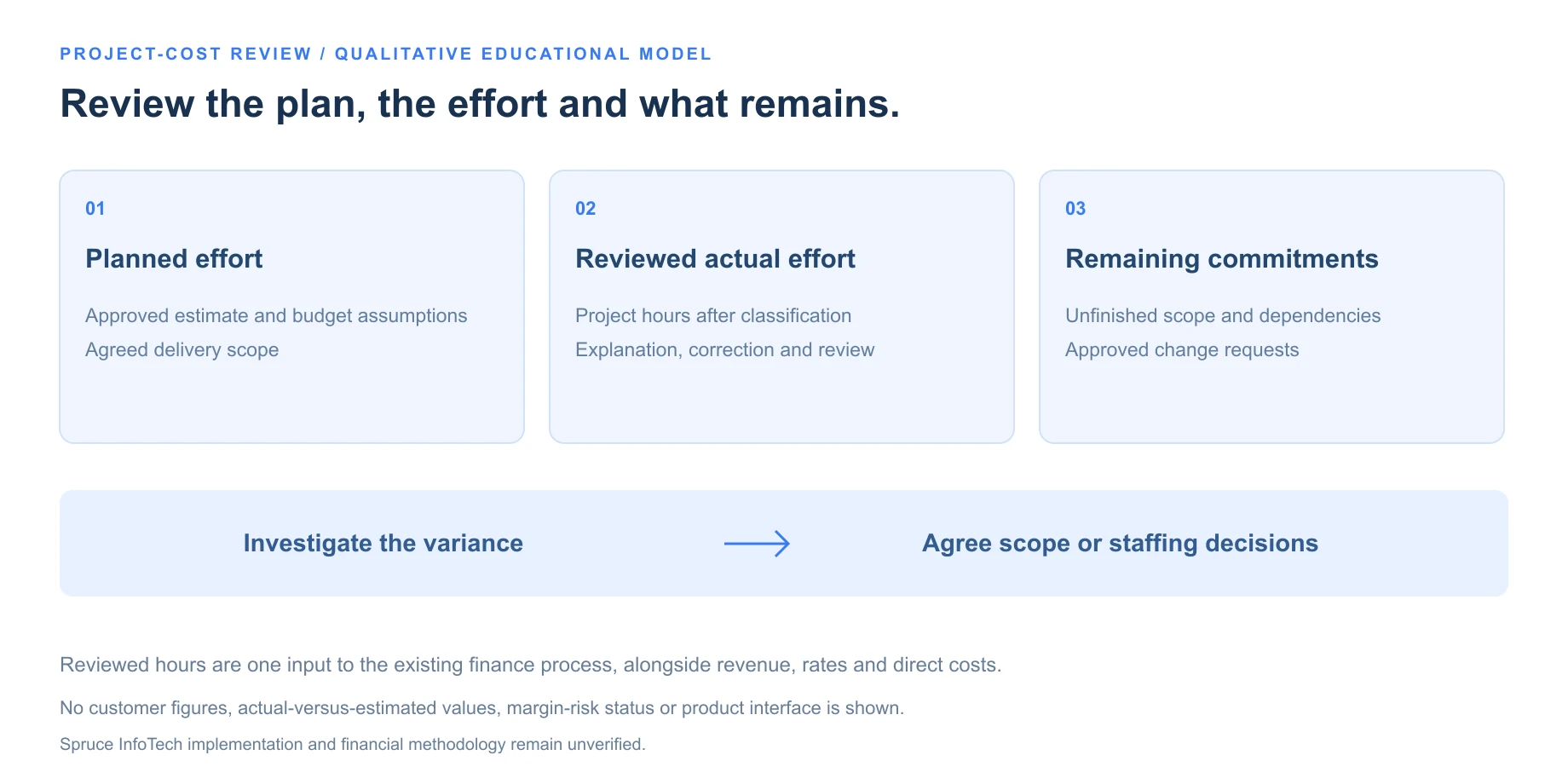
Compare the plan, the reviewed effort and the work still to do.
Planned effort
The approved estimate, budget assumptions and delivery scope.
Reviewed actual effort
Project hours after classification, explanation and correction.
Remaining commitments
Unfinished scope, dependencies and approved change requests.
Use the organization’s costing policy
- Labor cost
- Sum of (approved project hours × applicable loaded cost rate)
- Project contribution
- Project revenue − labor cost − direct delivery costs
- Contribution margin
- Project contribution ÷ project revenue × 100
Apply the appropriate rate for each role or cost category rather than assuming everyone has the same cost. The revenue and costs must cover the same project scope and period. Contribution margin is undefined when revenue is zero; this simplified contribution model is not a complete net-profit calculation.
These are educational formulas from the brief, not a statement of Spruce InfoTech’s finance policy. The final case study should confirm the customer’s method without exposing payroll, individual rates, contracts or client pricing.
Keep time evidence and financial records in their proper systems.
Approved hours are a labor-time input. Revenue, rates, direct costs and budgets come from the organization’s existing business systems.
| Engagement model | What reviewed effort helps examine | Additional business context |
|---|---|---|
| Time and materials | Missing time, incorrect allocation and invoice support | Contract terms, billability rules and approved rates |
| Fixed fee | Actual effort against estimates and possible scope expansion | Contract revenue, remaining work, direct costs and change requests |
| Managed services or retainers | Capacity consumption and included versus out-of-scope work | Service commitments, support mix and renewal assumptions |
The customer’s final implementation narrative should include only the engagement models it confirms.
Build a dependable project-time review.
Compare available work records with your existing project-management and finance process.
Measure the change
before claiming the outcome.
The supplied draft proposes less timesheet administration, fewer late or corrected records, earlier visibility into overruns and more dependable project-cost reporting. Its result fields contain placeholders. It provides no approved baseline, comparison dates, rollout population or measured project decisions.
The measures below define the evidence needed. They do not represent Spruce InfoTech results.
- Timesheet administration
- Define whether the measure includes employee entry, manager review, finance reconciliation, payroll or billing preparation. Compare the same activities over equivalent periods.
- Operations and finance time
- Record actual reconciliation hours before and after rollout. Separate recurring savings from setup, training or one-time cleanup work.
- Late, missing or corrected records
- Use consistent definitions and the same denominator. Changes in user count, entry volume or deadlines can affect the comparison.
- Earlier variance visibility
- Document when a material overrun would previously have been detected and when it was actually identified in the reviewed process.
- Projects reviewed for risk
- Retain the project-review records and the resulting staffing, scope, estimate or process decisions. Detecting risk does not establish a profitability increase.
- Unrecorded or misallocated hours
- Substantiate corrections with approved records. Do not convert hours into recovered revenue using an assumed billing rate.
Until that evidence is supplied, the story can explain a proposed operational model. It cannot state that Spruce InfoTech cut administration by a particular percentage, saved a number of hours or improved its margin.

Give each reviewer
the information they need.
Project-cost review does not require unrestricted access to individual activity. Define what the time reviewer, project lead, finance owner and client may each receive.
- Confirm the included teams, work periods and monitoring purpose.
- Document whether screenshots are enabled, and verify the actual scope and exclusions.
- Limit individual records to authorized reviewers and define retention.
- Provide a route for employee explanations and corrections.
- Transfer approved hours and project categories through the agreed business process.
- Keep individual pay rates and financial inputs restricted to the appropriate finance roles.
- Release scoped summaries without unrelated activity, client conversations or raw screenshots.
The actual Spruce InfoTech configuration, employee access, correction process and screenshot policy remain unconfirmed. Adapt the employee monitoring policy template to the settings the organization actually uses.
For distributed delivery, review remote employee monitoring software and verify work periods, permissions and reporting behavior before rollout. Public office locations do not establish a time-zone configuration or product integration.
The review should lead
to a useful decision.
Reliable hours matter beyond hourly billing.
Fixed-fee and service commitments consume delivery effort too. Reviewed hours can inform estimates, capacity and scope conversations.
A timely review can still change the plan.
Use actual effort and remaining work together. A final total alone cannot show every decision that was available during delivery.
Activity helps explain a variance.
A timeline is context for a question, not a project-profitability measure or a ranking of employees.
Consistent classification improves comparisons.
Agree project and work-category definitions before comparing delivery periods or investigating where effort went.
Exception review needs human judgment.
A smaller set of useful questions can support a review. The employee’s explanation and the manager’s decision still matter.
The intended connection is work record → manager validation → reviewed project hours → existing cost analysis → a scope, staffing or process decision. It is a stronger operational question than simply collecting more activity.
When evaluating a tool, use the employee monitoring software pricing guide alongside Neebix pricing. Check the plan, exports, retention and controls your workflow needs; the draft does not identify a customer plan or commercial agreement.
Explore related stories.
 Remote & Hybrid Teams / review draftPinpoint Hire: Work context for more focused manager conversationsCustomer approval and outcome evidence pending. ↗
 Operations & Back Office / review draftTransit & Flow: Connecting workflow evidence with capacity decisionsCustomer approval and outcome evidence pending. ↗
 Customer Support & Call Center / review draftLendware: Connecting support coverage with capacity decisionsCustomer approval and outcome evidence pending. ↗
 BPO & Outsourcing / review draft3 Link Sales: A clearer record behind every billable hourCustomer approval and outcome evidence pending. ↗