
A growing queue shows pressure.
It does not explain the cause.
The supplied brief uses the name Transit & Flow for a property-services operation. Its exact participating entity remains unconfirmed. The Group’s Columbus plumbing page describes a dedicated plumbing division serving Columbus and Central Ohio. The Plumbing site separately describes residential and commercial plumbing services.
Those public descriptions establish context for a service-office workflow. They do not establish which Group, Holdings or Plumbing entity used Neebix, or whether a rollout covered one division or the broader brand family. This draft does not combine their full service catalogs, locations or operating models into one approved customer description.
A service request can pass through intake, qualification, dispatch, appointment communication, estimating, field coordination, completion documentation, billing and follow-up. A delay at one handoff can hold up the next stage.
Is the backlog caused by genuine demand, an avoidable process step, missing information or insufficient capacity?
A symptom can have several causes
An invoice queue might reflect missing job-close notes, a pricing approval, repeated re-entry, inconsistent customer details, a technical fault or complex work. A dispatch delay might reflect demand, availability or a handoff problem. The backlog alone cannot identify which explanation is correct.
The actual service platform, communication tools, accounting system, previous process, work model and participating roles are not supplied. Examples in this article are investigation options, not confirmed customer discoveries.
Find the stage.
Review the work behind it.
The proposed approach combines a defined operating outcome, its workflow stage, relevant employee time and application context, and an explanation from the people doing the work.
Work-pattern evidence
Neebix sessions, time records, permitted app context and device state help frame the investigation.
Service and communication records
Existing tools retain requests, appointments, dispatch, estimates, completed jobs, calls and follow-up outcomes.
Financial and scheduling records
Invoices, corrections, payments, staffing plans and technician availability stay in their appropriate systems.
Employee and manager review
Coordinators and the relevant owner explain handoffs, missing information, workarounds, exceptions and the proposed change.
What Neebix contributes
Neebix’s public workforce monitoring features describe timesheets, application and website use, timelines, device status, optional screenshots and reports. An authorized reviewer can use that context to investigate a questioned period or repeated pattern.
This model does not replace service management, dispatch, estimating, invoicing or accounting. It does not establish a native field-service integration, automatic task-to-job assignment, process-mining engine, workflow automation or reclaimed-capacity calculation inside Neebix. Actual classifications, settings, transfer methods and operational changes require confirmation.
Application switching is a clue
Moving between a phone tool, field-service record and accounting application might be necessary. It might also reveal a repeated manual bridge between systems. Review the task and employee explanation before calling the pattern avoidable work.
Use time tracking vs employee monitoring for the distinction between a work record and its interpretation, and employee productivity metrics for output, quality and workload.
Confirm the bottleneck.
Test the next change.
The proposed improvement loop begins with an operating symptom and a baseline, then tests the explanation with employees. It does not attribute a delay to one application pattern or assume that another hire is unnecessary.
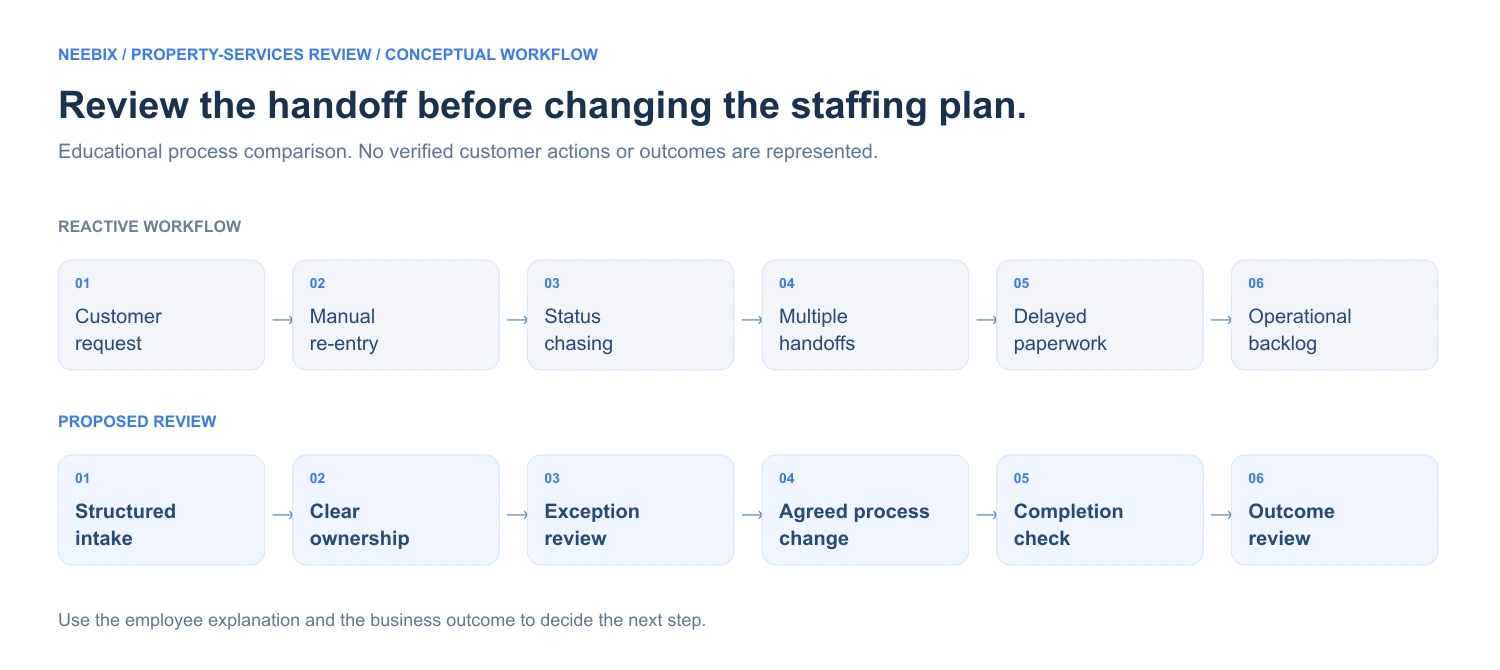
Bring ownership and review into the service-office handoff.
- Customer request
- Manual re-entry
- Status chasing
- Multiple handoffs
- Delayed paperwork
- Backlog
- Structured intake
- Clear ownership
- Exception review
- Agreed process change
- Completion check
- Outcome review
Identify the operational symptom
Start with a defined queue, dispatch delay, estimate turnaround, invoice backlog, missed follow-up or coordinator overtime. Confirm the division and workflow in scope.
Establish the business metric and baseline
Define the start and end events, completed unit, cycle time, administrative effort or correction rate. Use a representative period and record demand, weather, emergency volume and staffing context.
Review relevant work-pattern evidence
Examine permitted work periods, application context, device state and team patterns for that stage. Application switching suggests a question; it does not prove waste or causation.
Ask the people doing the work
Confirm missing information, approval dependencies, field handoffs, repeated entry, routine workarounds and technical problems with coordinators and the relevant field or system owner.
Test one controlled process change
Consider a form, ownership rule, handoff checklist, template, existing-system integration, allocation or training change. Record the actual change; none of these examples is a confirmed customer action.
Measure the same workflow again
Use comparable units, demand mix and time definitions. Review total team effort, cycle time, corrections, throughput, overtime and customer-service guardrails.
Keep, adjust or reverse the change
Retain a change only when the operational evidence supports it. Review whether work moved elsewhere and whether quality or privacy worsened before treating local time saved as reclaimed capacity.
Test a workflow hypothesis with the people doing the work.
Operational records identify a symptom. Work patterns and staff explanations help determine whether a process issue actually exists.
| Review area | Reactive process | Proposed process |
|---|---|---|
| Backlog | See the queue without its working context | Review the stage and the pattern behind the delay |
| Capacity | Assume a busy team has no usable capacity | Distinguish customer work, necessary support and avoidable repetition |
| Status checking | Interrupt the team to reconstruct progress | Start with relevant operational and work records |
| Application switching | Discuss switching through anecdotes | Investigate repeated patterns and the reason for them |
| Process change | Choose a fix without a consistent baseline | Test a defined change against comparable operating records |
| Staffing | Treat a larger queue as the hiring answer | Investigate friction before reviewing remaining demand |
| Overtime | See extra hours without the underlying cause | Compare workload, workflow stage and technical context |
| Follow-up | Assume the change was successful | Keep, adjust or reverse using quality and effort evidence |
On a small screen, scroll the table or diagrams to see all columns.
Investigate back-office bottlenecks before adding headcount.
Review the stage, test the explanation and measure the change against the customer outcome.
Measure a comparable unit.
Reconcile the whole team’s effort.
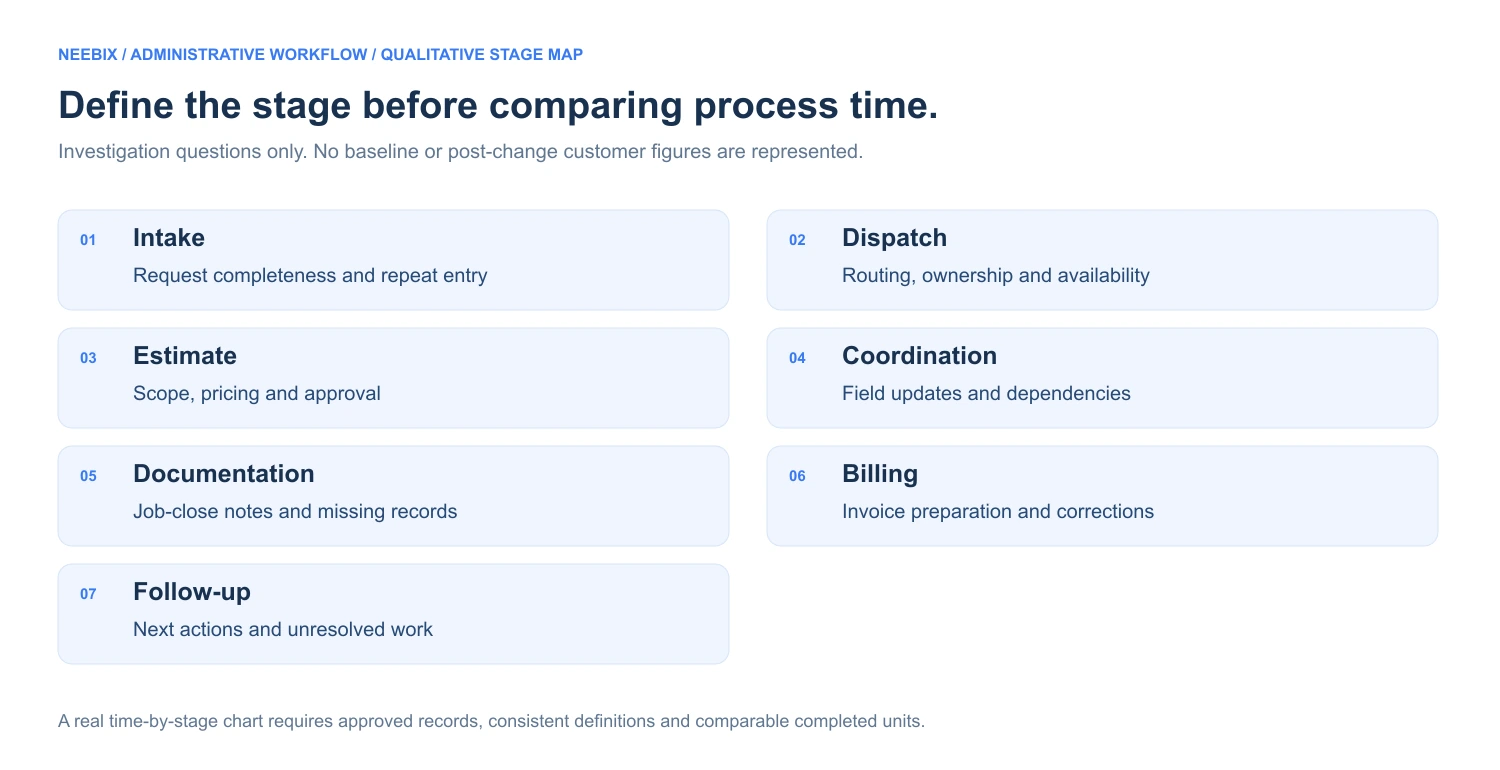
Choose the stage and define the outcome before measuring time.
- 01
Intake
Request completeness and repeat entry
- 02
Dispatch
Routing, ownership and availability
- 03
Estimate
Scope, pricing and approval
- 04
Coordination
Field updates and dependencies
- 05
Documentation
Job-close notes and missing records
- 06
Billing
Invoice preparation and corrections
- 07
Follow-up
Next actions and unresolved work
Define the calculation and its limits
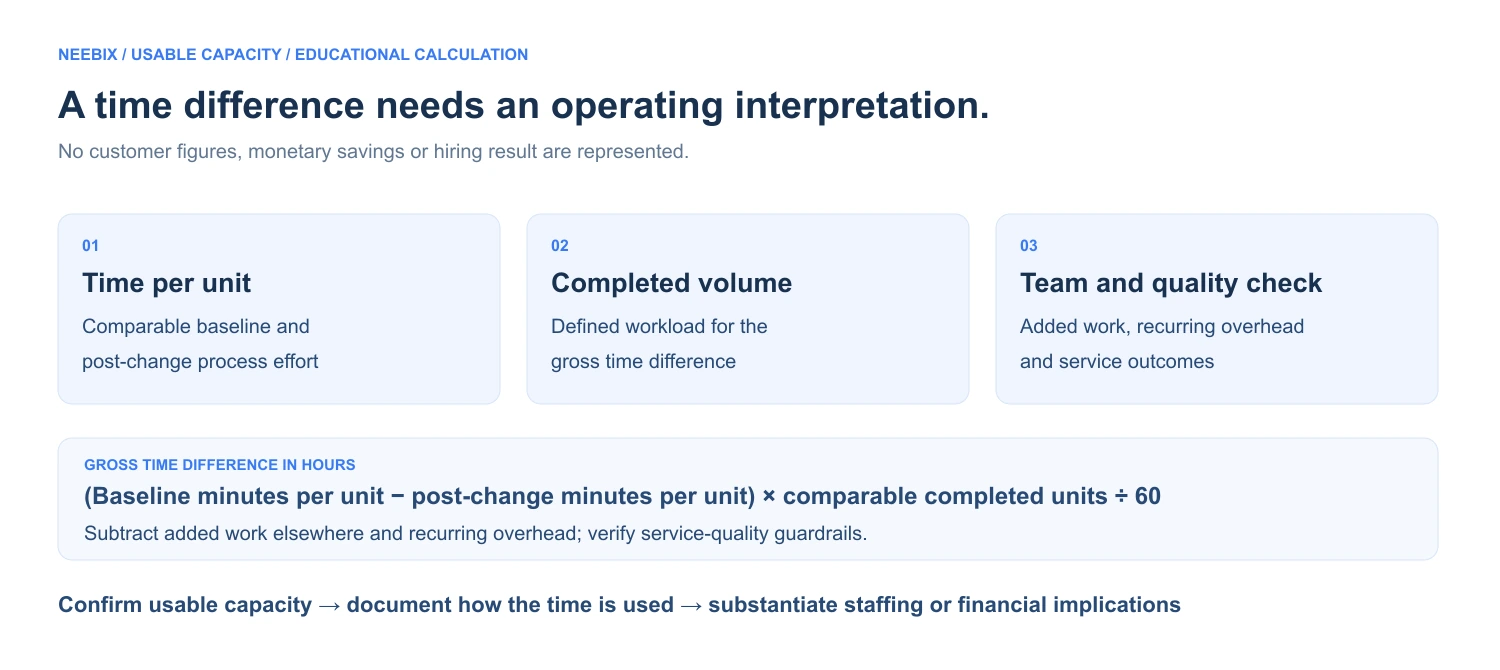
- Gross time difference for a comparable workload
- (Baseline minutes per completed unit − post-change minutes per completed unit) × comparable completed units ÷ 60
- Net usable team capacity
- Gross time difference − added work elsewhere − recurring overhead of the new process
- Throughput
- Comparable completed service requests ÷ coordinator-hours for the same scope and period
The first formula returns hours when the time-per-unit inputs are minutes. Define the completed unit, scope, demand mix and reference volume. A negative result means more time was required, not capacity reclaimed. Throughput is undefined when the eligible coordinator-hours denominator is zero.
Reassignment may free one coordinator while adding work to another; it does not by itself free total team capacity. Automation can introduce review or maintenance effort. Include that effort and any extra rework before claiming a net capacity result. Document one-time setup separately.
A time difference needs an operating interpretation.
Time per unit
Comparable baseline and post-change effort for the same process.
Completed volume
The defined workload used to calculate the gross time difference.
Team and quality check
Added work, recurring overhead, errors and customer-service outcomes.
Potential uses include better follow-up, less overtime, faster billing, training or handling more requests. A monetary saving, revenue benefit or deferred hire needs its own approved evidence. Protect response quality, dispatch accuracy, estimate quality, invoice corrections, reopened work, missed follow-ups and sustainable workload.
Evaluate the process change before claiming reclaimed capacity.
Use comparable completed units, actual team effort and service-quality outcomes. Keep the operational and financial implications distinct.
A measured change
needs a traceable explanation.
All results in the supplied brief are placeholders. No approved baseline, comparison period, operating records, confirmed bottleneck or actual process change was supplied. The evidence plan below does not represent customer results.
- Repetitive administration
- Define the workflow and included tasks. Compare actual team effort, completed units and equivalent periods; separate elimination, automation, reassignment and lower demand.
- Weekly usable capacity
- Keep the time-per-unit calculation, comparable reference volume, added work elsewhere, recurring overhead, quality guardrails and the actual use of the released time.
- Request-to-dispatch cycle
- Define both events, time zone, mean or median, request type, division and whether time includes nonbusiness hours. Distinguish queue waiting from employee effort.
- Job-completion-to-invoice cycle
- Define job close and invoice sent. Keep documentation, approval and accounting-system changes explicit; Neebix cannot receive sole credit for another system’s automation.
- Requests per coordinator-hour
- Use the same completed unit and eligible role-hours. Compare service mix, corrections, dispatch errors, complaints, reopened work and missed follow-up.
- Status checks and reporting
- Define internal messages, field follow-up, reports and customer callbacks separately. Avoid overlapping time or counts across categories.
- Overtime
- Compare the same roles and periods, accounting for weather, emergency volume, demand, expansion, leave, team size and service mix.
- Hiring decision
- Retain the real staffing plan, expected start, actual decision, deferral period, maintained workload and acceptable service quality. Do not claim permanent role elimination.
For each claim, retain the operational symptom, work-pattern finding, employee explanation, confirmed issue, actual change and measured outcome. A simultaneous improvement does not prove that application activity caused the original delay or that monitoring alone caused the result.

Investigate the process.
Protect the service record.
A property-services office may handle names, contact information, home addresses, appointment times, access instructions, private-property photos, estimates, payment details, technician information and internal messages.
- Confirm the actual entity, division, roles, devices and monitoring hours included.
- Document personal-device rules, screenshot settings, exclusions and retention.
- Limit employee-level access and exports to the authorized purpose.
- Provide a route for corrections, explanations and technical faults.
- Keep sensitive job, property, financial and customer information out of public examples.
- Explain how the review supports coaching and how any employment decision is handled.
The actual configuration is unconfirmed. Adapt the employee monitoring policy template and verify the screenshot monitoring controls against the real setup. A missing device record is not itself misconduct or a service failure.
For distributed or after-hours coordination, review the remote employee monitoring software guide. The draft does not establish a customer work model, technician device rollout or native scheduling integration.
Remove the repeated friction.
Keep the service judgment.
A full queue has several possible causes.
Higher demand may require staffing. Repeated entry, missing documentation or poor handoffs may require a process change.
The employee can explain the pattern.
Use the application record to locate a question, then ask why the task requires those steps.
Cycle time and effort are different.
A request can wait without consuming continuous employee time. Define both before comparing a change.
Local savings need a team check.
A task moved elsewhere is not automatically time eliminated. Include added effort and quality effects.
Capacity is not automatically cash.
Document how usable time was applied, and substantiate financial or staffing implications separately.
Keep room for service work.
Customer empathy, emergency judgment, complex estimates, training, quality review and breaks remain necessary.
The intended chain is an operating symptom → a work-pattern investigation → a confirmed process issue → a controlled change → measured usable capacity → a reviewed growth or staffing decision. Each step needs evidence before becoming a customer claim.
Use the employee monitoring software pricing guide alongside Neebix pricing to evaluate the records, reports, retention and controls required. The brief does not identify an approved customer plan or commercial agreement.
Explore related stories.
 Remote & Hybrid Teams / review draftPinpoint Hire: Work context for more focused manager conversationsCustomer approval and outcome evidence pending. ↗
 Customer Support & Call Center / review draftLendware: Connecting support coverage with capacity decisionsCustomer approval and outcome evidence pending. ↗
 Agency & Professional Services / review draftSpruce InfoTech: From reviewed project hours to clearer cost decisionsCustomer approval and outcome evidence pending. ↗
 BPO & Outsourcing / review draft3 Link Sales: A clearer record behind every billable hourCustomer approval and outcome evidence pending. ↗